
Chapter 2: Configuring Your AI Dev Team
"The setup chapter is the one everyone skips and then regrets. Don't skip this one. Every hour you invest here saves ten hours later."
On this page


- The four layers of the AI stack (model, client, capability, conventions) and which layer to fix when something goes wrong
- What Claude Code and GitHub Copilot cost, and which plan you actually need
- Every configuration file your AI Client / Harness reads: Claude Code's settings and
CLAUDE.md, and their GitHub Copilot equivalents - How to configure the MCP servers that matter for Power Platform, and where each client keeps them
- How to set permissions (Claude Code allow and deny rules, the Copilot CLI's
--allow-tooland--deny-tool) so the agent works without constant prompts - How to set up PAC CLI with an auth profile per environment
- The difference between a skill, a plugin, an MCP server and an agent, and how to install the Power Platform skill packs
- How to set up all four AI clients (Claude Code, the GitHub Copilot CLI, the GitHub Copilot App and Copilot in VS Code) and which one runs which workflow
- A copy-paste configuration reference for a new project
The AI Stack: Four Layers
Before you install anything, know what you are assembling. The tools in this chapter are not four products competing for one job. They are four layers that stack, and nearly every point of confusion in AI-assisted development comes from mixing two of them up.
 MCP servers
 Power Platform pluginsSkills such as /dv-metadata
 Claude Code
 Copilot CLI, App, VS Code
Figure 2.1. You choose layers 1 and 2, install layer 3 and write layer 4. Every client in this book sits on layer 2, and the same conventions sit on top of any of them.
Layer 1: The model
The model is the reasoning engine. It reads your prompt, thinks and produces text. On its own it knows nothing about your environment and cannot run anything. A better model improves the thinking, not what the tool can reach.
Anthropic names its models; GitHub Copilot increasingly picks one for you. Auto model selection is the only option on Copilot Free and Student, while paid plans also get premium models, including Anthropic's current Claude family alongside OpenAI's GPT models.123
Fast answers, simple completions, classification and routing.
claude-haiku-5-5, from $0.10 / $0.50The best balance of speed and depth for generating flows, apps and schema.
claude-sonnet-5-5, $2 / $10Long-running agentic coding, architecture and multi-table design.
claude-opus-5-5, $4 / $20The most demanding reasoning and long-horizon work, at a premium.
claude-fable-5-1, $10 / $50AutoCopilot chooses a model per task. On Free and Student it is the only option.
Claude modelsThe current Claude family (Haiku, Sonnet and Opus 5.5) in the model picker. Fable needs an enterprise admin to enable it.
OpenAI's current GPT models, including a Codex model that Copilot keeps as its long-term support fallback.
Figure 2.2. The same layer, two buying models. With Claude you pick the model; with Copilot you can let Auto pick for you. Select a client to compare.
Layer 2: The client
The client is where you work, and it owns the loop: it reads your files, runs commands, applies edits and asks permission before it touches anything important. This book calls it your AI Client / Harness. The two names mean the same thing, and the choice is yours. The model supplies the thinking; the AI Client / Harness supplies the hands.
Four clients matter here, and they split in two. Claude Code and the GitHub Copilot CLI are agentic terminal clients that run the Power Platform skill packs; the build chapters use them. Copilot in VS Code and the GitHub Copilot App speed up in-editor work and design conversations. Every build chapter works in whichever client you choose, and where a step is client-specific, the equivalent is shown alongside.
Choosing a client? The Set Up Your Tools guide walks through Claude Code, the GitHub Copilot CLI and Copilot in VS Code, with a short video overview of the client layer.
Layer 3: Capability (MCP servers, plugins and skills)
A model plus a client can write code. It still cannot see your Dataverse environment or know the right way to author a Power Pages site. That is layer 3, and it arrives in four shapes that people constantly confuse.
/dv-metadata authors tables, columns and relationships./plugin install.dataverse plugin, nine skills from /dv-connect to /dv-solution.Figure 2.3. A plugin is the box; skills, MCP servers and agents are what come inside it.
The distinction that matters most: a skill is knowledge, an MCP server is access. A skill teaches the agent the correct way to author a Dataverse column. The MCP server lets it see that fs_workorder already exists and what its columns are called. Skills without MCP produce confident, plausible, wrong output: invented column names that look right. MCP without skills produces output that is correct about your environment but ignores every convention your team agreed. You want both, so this chapter installs both.
Figure 2.4. Each half alone fails in a predictable way. Only the top-right quadrant produces output you can deploy.
At the time of writing, Microsoft's power-platform-skills marketplace lists 11 plugins carrying about 140 skills, Dataverse included, and Copilot Studio ships its own plugin.4 That count changes with every release, so the current list lives in the Builder Skills catalogue rather than in this chapter.
Layer 4: Your conventions
The top layer is the only one nobody can ship for you. Your publisher prefix, table naming, form layout rules and hard prohibitions are not discoverable from the environment or bundled in a plugin. They live in CLAUDE.md for Claude Code and in .github/copilot-instructions.md for Copilot, and the two files hold the same content.
This is the cheapest quality lever in the stack and the one most teams skip. An afternoon spent on a good instruction file improves every prompt you send afterwards, in every client.
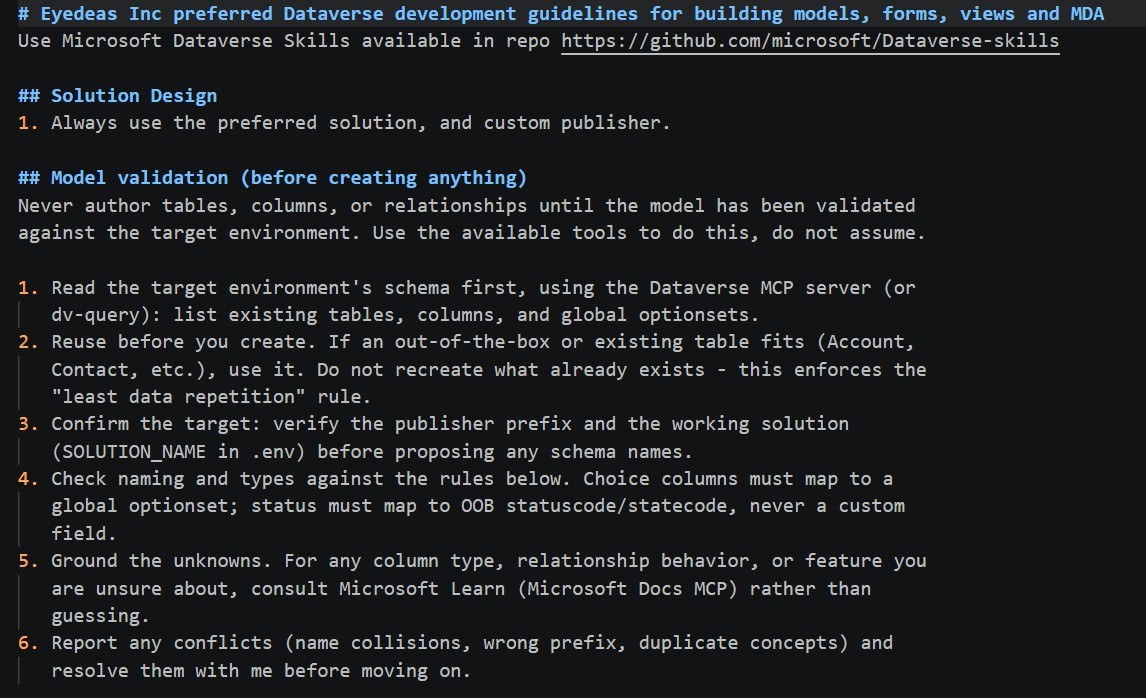
Figure 2.5. A real layer 4. This excerpt of the author's Dataverse conventions is plain markdown, yet it changes how every client behaves: the agent reads the live schema through the MCP server, reuses before it creates and stops to report conflicts. Layer 4 is directing layer 3. Image: Zero to Hero.
Why the layers matter
Thinking in layers turns vague frustration into a specific fix. Almost nobody's first problem is the model. It is nearly always layer 3 or layer 4.
| Symptom | Layer | Fix |
|---|---|---|
| Well written, but wrong about your data | Layer 3: Capability | Connect the MCP server; it is missing or not connected |
| Technically correct, but ignores your standards | Layer 4: Conventions | Strengthen your instruction file |
| The agent stops and cannot run a command | Layer 2: AI Client / Harness | Adjust permissions |
| Shallow reasoning on a genuinely hard question | Layer 1: Model | Move up a model tier |
Figure 2.6. Read the symptom, find the layer. Check layers 3 and 4 before you pay for a bigger model.
The Configuration Landscape
Before touching any file, know what you are configuring and why.
graph TD
    subgraph CC["Claude Code: read at session start"]
        G1["~/.claude/settings.json<br/>(global)"]
        G2["~/.claude/CLAUDE.md"]
        P1[".claude/settings.json<br/>(project, committed)"]
        P2[".claude/settings.local.json<br/>(personal, gitignored)"]
        P3["CLAUDE.md (project)"]
        SK[".claude/skills/"]
    end
    subgraph GH["GitHub Copilot: read while editing"]
        C1[".github/copilot-instructions.md"]
        C2[".vscode/settings.json"]
        C3[".vscode/extensions.json"]
    end
    subgraph PAC["PAC CLI: auth profiles"]
        A1["Dev / UAT / Prod<br/>named profiles"]
    end
    CC ~~~ GH
    GH ~~~ PAC
    style CC fill:#13131f,color:#f1f0f8
    style GH fill:#1a1a2e,color:#f1f0f8
    style PAC fill:#13131f,color:#f1f0f8
Figure 2.7. The full configuration landscape. Claude Code reads a layered set of files at session start, GitHub Copilot reads project files as you edit, and PAC CLI keeps its authenticated environment profiles separately.
Part 1: Claude Code
Installation
Prerequisites: a Claude Pro, Max, Team or Enterprise plan, or a Claude Console account with API billing (see Licensing below). The native installer needs nothing else and updates itself in the background. The npm route needs Node.js 22 or later.5
claude --version.# macOS / Linux / WSL: native installer (recommended)
curl -fsSL https://claude.ai/install.sh | bash
claude --version # verify# Windows PowerShell: native installer (recommended)
irm https://claude.ai/install.ps1 | iex
claude --version # verifyGit for Windows is optional. With it, Claude Code uses Git Bash for shell commands; without it, Claude Code uses PowerShell.
curl -fsSL https://claude.ai/install.cmd -o install.cmd && install.cmd && del install.cmd
claude --version# Homebrew (macOS, Linux)
brew install --cask claude-code
# WinGet (Windows)
winget install Anthropic.ClaudeCode
# npm (any OS, Node.js 22+)
npm install -g @anthropic-ai/claude-codeHomebrew and WinGet installs do not auto-update. Run brew upgrade claude-code or winget upgrade Anthropic.ClaudeCode now and then.
Figure 2.8. One command per system. If claude is not found afterwards, open a new terminal so your PATH picks up the install.
Signing In
On a Claude subscription you do not need an API key. Run claude and it opens a browser to sign in; inside a session, /login does the same. Once you are in, register your first MCP server and check it connected.
Claude Code~/field-serviceFigure 2.9. Install, sign in, add a server, confirm it connected: the whole first run in under a minute. Output lines are simplified.
If you use API billing instead, create a key in the Claude Console under API Keys and set it in your shell profile. Claude Code asks once whether to use it, then skips the browser sign-in.
# Windows PowerShell: add to $PROFILE
$env:ANTHROPIC_API_KEY = "sk-ant-api03-..."# macOS / Linux: add to ~/.zshrc or ~/.bashrc
export ANTHROPIC_API_KEY="sk-ant-api03-..."Spend limits (API billing): set a monthly spend limit in the Claude Console before any heavy use. A Claude Code session for Power Platform work typically costs $0.10 to $2.00. A runaway agentic loop can cost more, and the limit prevents surprises.
Licensing
Before configuring anything, know what you are paying for and what you are not.
Claude Code and the Claude API
Claude Code needs a paid Claude plan or API billing. The free Claude.ai plan does not include it.5 Downloading the tool costs nothing; using it draws on your subscription's usage allowance or your API balance. There is no separate Claude Code subscription.
ProEnough to work through this book and for light daily use.
Five or twenty times Pro's usage, for long agentic sessions every day.
Team standard and premium seats both include Claude Code. Enterprise adds central admin, with usage billed at API rates.
No subscription. You pay per token, per model, and set your own spend limit.
Figure 2.10. Four ways to pay for the same tool. For this book, Pro is the smallest plan that works; move up when you hit usage limits, not before.6
How you are billed: on a subscription, Claude Code usage counts against your plan's limits instead of producing a per-token bill. On API billing, every message you send and every response Claude generates consumes tokens, priced per model, and the Console shows your usage.
Which model to use: for day-to-day Power Platform work (generating flows, scaffolding Canvas apps, reviewing Dataverse schema), Sonnet is the right default. Reserve Opus for moments where quality matters more than cost, such as a complex multi-table data model or a production-critical system prompt.
What a typical session costs on API billing:
| Task | Approximate cost |
|---|---|
| Generate a Dataverse data model (5 tables) | $0.05 to $0.15 |
| Scaffold a 3-screen Canvas app | $0.10 to $0.30 |
| Generate and review a Power Automate flow | $0.05 to $0.20 |
| Full chapter review and revision cycle | $0.20 to $0.80 |
| Extended multi-file refactoring session (1 to 2 hours) | $1.00 to $3.00 |
These are the author's estimates on Sonnet. Context size drives cost more than anything else: the more files Claude Code reads, the more tokens it uses. That is another reason the skills and CLAUDE.md approach matters. Well structured context is also efficient context.
Setting a spend limit: in the Claude Console, open your billing settings and set a monthly limit before serious use. $20 to $50 a month is a reasonable start for one developer: hundreds of generation sessions, with no risk of a runaway loop producing a surprise bill.
GitHub Copilot
GitHub Copilot is a subscription. Individuals and organisations buy different plans, and usage beyond code completions draws on a monthly allowance of AI credits.2
FreeLimited chat and agent use, Auto model only. Verified students get Copilot Student free.
ProCovers every workflow in this book: the CLI running the Power Platform plugins, agent mode, MCP and instructions files.
BusinessThe same workflows plus central seat management and Copilot policy control.
EnterpriseEverything in Business, a larger AI credit allowance per user and enterprise features.
Figure 2.11. The question that matters is who is buying. As an individual, Pro is enough; as an organisation, Business is the default and Enterprise is worth evaluating for a wide rollout.
Free access: verified students get Copilot Student at no cost, and verified teachers and maintainers of popular open-source projects may qualify for free Copilot Pro. Start at education.github.com. Eligibility is verified, not applied automatically.
Activating in VS Code: sign in from the Copilot icon in the Status Bar. VS Code uses your subscription if you have one and enrols you in Copilot Free if you do not.
Corporate procurement note: your organisation may already license Copilot Business or Enterprise, directly from GitHub or through a Microsoft agreement. Check with IT procurement before buying individually.
PAC CLI and MCP Servers
PAC CLI is a free Microsoft tool. Most MCP servers in this chapter cost nothing to install: Canvas Authoring arrives with the Canvas Apps plugin, Microsoft Learn is a free hosted endpoint, and Context7 offers a free API key.
The Dataverse MCP server is the exception to watch. Since December 15, 2025, Microsoft charges Dataverse MCP tool calls made by agents created outside Copilot Studio, which includes Claude Code and GitHub Copilot, in Copilot Credits. The search_data tool bills at the tenant graph grounding rate; the other tools bill at the basic text and generative AI rate. Users with Dynamics 365 Premium licenses or a Microsoft 365 Copilot user license are not charged when the data accessed is Dynamics 365 data.7 Check the current rates before heavy use.
Power Platform licensing note: apart from your AI Client / Harness subscription and Dataverse MCP usage, the tools in this chapter add no licensing cost. The solutions you build carry their own requirements when deployed to users: Premium connectors, Dataverse capacity, Power Pages monthly active users. Budget for production licensing separately from development tooling.
| How you pay | Price points | |
|---|---|---|
| Claude Code | A Claude subscription, or a Claude Console API key billed per token and per model | Pro $20/month, Max 5x $100, Max 20x $200, Team from $25/seat, Enterprise; or pay per token |
| GitHub Copilot (CLI, VS Code, App) | A per-user subscription with monthly AI credits | Individuals: Free $0, Pro $10/month, Pro+ $39, Max $100. Organisations: Business $19/seat/month, Enterprise $39/seat/month |
| PAC CLI and MCP servers | Mostly free | PAC CLI, Canvas Authoring, Microsoft Learn and Context7 cost nothing. Dataverse MCP tool calls from agents built outside Copilot Studio are billed in Copilot Credits since December 15, 2025, unless the user has Dynamics 365 Premium or a Microsoft 365 Copilot license and the data is Dynamics 365 data |
| The solutions you build | Power Platform licensing for your users | Premium connectors, Dataverse capacity, Power Pages active users: budget separately |
Figure 2.12. Either AI Client / Harness is a modest line item, and the Power Platform tooling underneath costs nothing extra. Whichever you choose, set a spend limit or seat policy before heavy use.
~/.claude/settings.json: Global Settings
This is the most important configuration file. It governs what should apply across all your projects: permissions, model preference, environment variables. MCP servers are not configured here. Claude Code keeps them in .mcp.json (project) or ~/.claude.json (user and local scopes), written for you by claude mcp add. Part 2 covers them.
// ~/.claude/settings.json
{
  // Default model for all sessions
  "model": "claude-sonnet-5-5",

  // MCP servers live in .mcp.json or ~/.claude.json, not here (see Part 2)

  // Permissions — commands Claude Code can run without asking
  "permissions": {
    "allow": [
      "Bash(pac:*)",
      "Bash(npm:*)",
      "Bash(git status)",
      "Bash(git diff:*)",
      "Bash(git log:*)",
      "Bash(git add:*)",
      "Bash(git commit:*)"
    ],
    "deny": [
      "Bash(rm -rf:*)",
      "Bash(git push --force:*)"
    ]
  }
}.claude/settings.json: Project Settings
Stored in your project folder under .claude/. It overrides global settings for this project only. Commit it to git: it holds the configuration every team member should share. The project's shared MCP servers sit beside it in .mcp.json at the project root, also committed.
// .claude/settings.json  (committed to git)
{
  // Project-specific allowed commands
  "permissions": {
    "allow": [
      "Bash(pac solution:*)",
      "Bash(pac canvas:*)",
      "Bash(pac pages:*)",
      "Bash(pac auth:*)"
    ]
  }
}.claude/settings.local.json: Local Overrides
Same structure as settings.json, but never committed to git (add it to .gitignore). Use it for personal overrides and machine-specific values. For MCP server secrets, keep the value in an environment variable and reference it from .mcp.json as ${VAR}, or register a private server with claude mcp add --scope local, which stores it in ~/.claude.json for this project only.
// .claude/settings.local.json  (gitignored)
{
  // Personal overrides for this project only
  "model": "claude-opus-5-5",

  "permissions": {
    "allow": [
      "Bash(pac data:*)"
    ]
  }
}
Layering order:
settings.local.jsonoverridessettings.json, which overrides~/.claude/settings.json. Permission rules are the exception: deny rules from any level are checked before allow rules from any level. You keep personal values out of git and still commit the project structure.
The CLAUDE.md Files
CLAUDE.md is plain markdown that Claude Code reads at the start of every session. It shapes every response, every generated file and every decision for the rest of that session. Think of it as the standing brief you hand a developer before they start.
There are two levels:
~/.claude/CLAUDE.md: Global User Memory
Applies to every Claude Code session in every project. Use it for personal preferences and cross-project standards.
# My Development Standards

## General Preferences
- Always explain what you're about to do before doing it
- When generating files, show a summary of what was created
- Prefer small, targeted edits over large rewrites when modifying existing files
- Ask before deleting any file

## Power Platform Standards (apply to all projects)
- All flows use connection references — never direct connection names
- All sensitive configuration values go in environment variables
- Canvas apps: Tablet layout (1920×1080) unless told otherwise
- Dataverse columns: use schema names in all expressions and queries

## Communication Style
- Be concise. Skip preamble.
- If something is ambiguous, ask one clarifying question before proceeding
- When reviewing generated output, lead with what's correct, then flag issuesCLAUDE.md: Project Context
Lives in the project root and holds project conventions, table names, environment URLs and team standards. The more precise it is, the less correcting you do.
# Project: Contoso Field Service App

## Environment
- Dev:  https://contosodev.crm.dynamics.com
- UAT:  https://contosouat.crm.dynamics.com
- Prod: https://contoso.crm.dynamics.com
- Solution name: FieldServiceApp
- Publisher prefix: fs_
- Publisher name: Contoso

## Connection References (use these exact names in all flows)
- Dataverse: shared_commondataservice
- Office 365 Outlook: shared_office365
- Microsoft Teams: shared_teams
- SharePoint: shared_sharepointonline

## Environment Variables (never hardcode these values)
- DispatcherEmail — email address of the duty dispatcher
- ManagerEmail — email address of the operations manager
- ModelDrivenAppUrl — URL to the model-driven app (for deep links in emails)
- ReorderThresholdDays — days before expiry to trigger reorder

## Key Tables and Schema Names
| Display Name      | Schema Name          | Key Columns                            |
|-------------------|----------------------|----------------------------------------|
| Work Order        | fs_workorder         | fs_name, statuscode, fs_priority, fs_scheduleddate |
| Technician        | fs_technician        | fs_name, fs_skilllevel, fs_availabilitystatus |
| Service Location  | fs_servicelocation   | fs_name, fs_addressline1, fs_restrictedaccess |
| Parts Used        | fs_partsused         | fs_quantity, fs_unitcost               |

## Canvas App Standards
- Layout: Tablet 1920×1080
- Naming: scrScreenName, galGalleryName, btnButtonName, txtInputName
- Colors: Primary #1B3A6B, Accent #E87722, Surface #F8F9FA
- Every gallery must have an empty-state message: "No records found"
- Every Patch() must have error handling via IfError()

## Flow Standards
- Name format: "Contoso - [Trigger Table] - [Purpose]"
- All Dataverse columns referenced by schema name, not display name
- Error handling required on: HTTP, email send, approval actions
- Approval flows: 7-day timeout with escalation branch

## Power Pages Standards
- Publisher prefix: fs_
- All FetchXML must include account filter for the authenticated user
- All Web API calls must include CSRF token
- User input must be escaped with | escape filter

## Do Not
- Do not use App.OnStart for data loading in Canvas apps
- Do not create tables without Status and Status Reason columns
- Do not hardcode GUIDs anywhere
- Do not use text fields for fixed-choice data
- Do not commit .claude/settings.local.json
Claude Code Permissions
By default, Claude Code asks before running most shell commands. Many Power Platform commands are routine, and approving each one adds friction without adding safety.
Configure the allow list in ~/.claude/settings.json:
{
  "permissions": {
    "allow": [
      // PAC CLI — all Power Platform operations
      "Bash(pac solution:*)",
      "Bash(pac canvas:*)",
      "Bash(pac pages:*)",
      "Bash(pac auth:*)",
      "Bash(pac data:*)",
      "Bash(pac flow:*)",
      "Bash(pac pcf:*)",
      "Bash(pac copilot:*)",

      // npm — package management
      "Bash(npm install:*)",
      "Bash(npm run:*)",
      "Bash(npm build:*)",

      // git — read-only and safe write operations
      "Bash(git status)",
      "Bash(git diff:*)",
      "Bash(git log:*)",
      "Bash(git add:*)",
      "Bash(git commit:*)",
      "Bash(git pull:*)",
      "Bash(git checkout:*)",
      "Bash(git branch:*)"
    ],
    "deny": [
      // Never allow without explicit confirmation
      "Bash(rm -rf:*)",
      "Bash(git push --force:*)",
      "Bash(git reset --hard:*)",
      "Bash(pac solution delete:*)"
    ]
  }
}
The deny list matters. An explicit deny blocks a command even when an allow rule matches it. Protect the operations that are hard to reverse. The GitHub Copilot CLI does the same job with its
--allow-tooland--deny-toolflags, covered in Part 5.
flowchart TD
    T["The agent wants to run a command<br/>e.g. pac solution delete"] --> D{"Matches a<br/>deny rule?"}
    D -->|"yes"| B["Blocked"]
    D -->|"no"| A{"Matches an<br/>allow rule?"}
    A -->|"yes"| R["Runs without a prompt"]
    A -->|"no"| Q["Asks you first"]
    style B fill:#f87171,color:#0d0d14
    style R fill:#2dd4bf,color:#0d0d14
    style Q fill:#EAB308,color:#0d0d14
Figure 2.13. Deny is checked first, so an allow rule can never carve an exception out of a deny rule. Claude Code's allow and deny lists and the GitHub Copilot CLI's --allow-tool and --deny-tool flags both work this way. Claude Code also supports ask rules, checked after deny and before allow.8
The Skills Directory
Skills are markdown files that encode reusable procedures. The ones you write yourself live in two places:
~/.claude/skills/           # Global — available in every project
.claude/skills/             # Project — available only in this project,
                            # overrides global if same name
Installing the Power Platform Skill Packs
Microsoft publishes the official Power Platform plugins at github.com/microsoft/power-platform-skills, with Dataverse developed in its own microsoft/Dataverse-skills repository and listed in the same marketplace.4 Add the marketplace once, then install plugins individually. No git clone is needed.
/plugin marketplace add microsoft/power-platform-skills
/plugin marketplace add microsoft/skills-for-copilot-studio   # only for Copilot Studio
The same commands work in a Claude Code session and in a GitHub Copilot CLI session (Part 5). Dataverse is also listed in Anthropic's official marketplace (dataverse@claude-plugins-official) and, for Copilot, in awesome-copilot (dataverse@awesome-copilot).
These are the official Microsoft plugins. The enterprise skills you write yourself (Chapter 10) layer on top of them, encoding your environment's conventions and project patterns. They complement the official plugins; they do not replace them.
/dv-connect to register the Dataverse MCP server./plugin install dataverse@power-platform-skills.pa.yaml, with the Canvas Authoring MCP server./plugin install canvas-apps@power-platform-skills/plugin install model-apps@power-platform-skills/plugin install code-apps-preview@power-platform-skills/plugin install mobile-app@power-platform-skills/plugin install power-apps-mobile-extension@power-platform-skills/plugin install pcf@power-platform-skills/plugin install power-automate@power-platform-skills/plugin install process-intelligence@power-platform-skills/plugin install power-pages@power-platform-skills/plugin install copilot-studio@skills-for-copilot-studio/plugin install mcp-apps@power-platform-skillsFigure 2.14. Twelve plugins, one install pattern. Start with Dataverse plus the plugin for the asset you build next; the Part 2 chapters tell you which one each needs.
Listing Skills
Inside a Claude Code session, /skills lists every skill available to you, plugin skills included, and /plugin manages the plugins themselves:
/skills
/plugin list
Or, for the skills you wrote yourself, from the terminal (plugin skills are managed with /plugin and are not copied into these folders):
ls ~/.claude/skills/
ls .claude/skills/
How an Agentic Client Works: Explore, Plan, Code, Commit
Before you use Claude Code or the GitHub Copilot CLI on a real project, understand the rhythm both follow. An agentic AI Client / Harness does not just write code. It works in a four-stage loop that mirrors how experienced developers approach a task, and knowing the loop tells you when to step in.
graph TD
    E["Explore<br/>read CLAUDE.md,<br/>query Dataverse MCP"] --> P["Plan<br/>propose approach,<br/>wait for confirm"]
    P --> C["Code<br/>generate + validate<br/>+ auto-fix"]
    C --> Cm["Commit<br/>stage to git,<br/>rollback point"]
    Cm -.repeats.-> E
    style E fill:#7c3aed,color:#f1f0f8
    style Cm fill:#2dd4bf,color:#0d0d14
Figure 2.15. The four-stage loop an AI Client / Harness follows on every task. The dotted arrow is the important part: it repeats.
Explore
The agent starts by reading, not writing. It reads your conventions file (CLAUDE.md or .github/copilot-instructions.md) for project standards, any relevant existing files (existing Canvas YAML, solution XML, flow JSON), and if MCP servers are configured, it queries your live Dataverse schema. That is how it knows your publisher prefix, your real column names and your environment's topology before it generates a line.
If you skip the Explore stage by giving the agent a task with no context, it invents. Column names, table names, and environment assumptions will be plausible but wrong. The conventions files from Parts 1 and 4 and the MCP servers from Part 2 of this chapter exist specifically to make the Explore stage accurate.
Plan
Before writing any files, the agent proposes an approach. In interactive mode, it tells you what it intends to do and waits for your confirmation. This is the moment to:
- Redirect if the approach is wrong
- Add constraints you forgot to mention
- Ask the agent to explain its reasoning if you're uncertain
You can trigger an explicit plan before any task by prefixing your prompt:
Think step by step about what you'd need to do to generate the Technician Canvas app
from the requirements in requirements.md, then tell me your plan before writing anything.
You get a plan to review, adjust and approve, instead of discovering the wrong approach after 200 lines of YAML.
Code
Once the plan is confirmed, the agent generates the assets: .pa.yaml files, flow JSON, Dataverse schema XML, Liquid templates, or whatever the task requires. It also runs PAC CLI commands itself, such as pac solution pack or pac pages upload, as part of the loop. You do not run them by hand.
During the Code stage, the agent may iterate: generate, validate, read the error, correct, validate again. For Canvas apps, this compile-fix-compile loop runs automatically until the asset is valid or the agent surfaces an error it can't resolve without your input.
Commit
After a successful generation, ask the agent to stage and commit the output. Each commit is a clean rollback point: if the next iteration breaks something, git reset --hard HEAD~1 takes you back to the last good state.
Keep your Power Platform solution folder inside the git repository. The agent commits what is in the working tree. If your
.pa.yamlfiles and solution XML live outside the repo, the commit has nothing to capture. Chapter 3 sets up the standard folder structure.
One task is rarely one pass. "Build a Technician Canvas app" will likely run Explore, Plan, Code, Commit three to five times as the agent generates screens, validates them, fixes delegation issues, adds navigation and refines from your feedback. Each commit captures a stable increment.
Part 2: MCP Servers for Power Platform
MCP (Model Context Protocol) servers give your AI Client / Harness live access to external systems. Without them, the agent generates generic Power Platform code. With them, it generates code that matches your live environment.
Where you register a server depends on the client, and it is never settings.json.
claude mcp add- Project scope:
.mcp.jsonin the project root, committed - User and local scopes:
~/.claude.json, private to you
copilot mcp add- User level:
~/.copilot/mcp-config.json, or/mcp addin a session - Project:
.mcp.jsonor.github/mcp.json, once you trust the folder
MCP: Add Server- Workspace:
.vscode/mcp.json, top-level keyservers - Global:
~/.copilot/mcp-config.json, shared with the CLI - Project-root
.mcp.jsonbehind an experimental setting
Figure 2.16. Three clients, three registries. Many servers arrive with the official plugins, which register them for you in whichever client you install the plugin into.910
What MCP Servers Do
Each MCP server exposes a set of tools your AI Client / Harness can call during a session. Claude Code and the Copilot clients discover the tools at session start and use them when relevant. You do not invoke them by name.
flowchart LR
    H["Your AI Client / Harness<br/>discovers tools at session start"]
    subgraph ENV["Your environment"]
        DV["Dataverse MCP<br/>tables, columns, data"]
    end
    subgraph AUTH["Authoring knowledge"]
        CA["Canvas Authoring MCP<br/>controls, properties, APIs"]
    end
    subgraph DOCS["Current documentation"]
        PP["Power Pages<br/>Liquid, Web API"]
        ML["Microsoft Learn<br/>Power Platform, Azure, M365"]
        C7["Context7<br/>React, Vite, Fluent UI"]
    end
    H --> DV
    H --> CA
    H --> PP
    H --> ML
    H --> C7
    DV --> E[("fs_ tables in<br/>your dev environment")]
    style H fill:#a855f7,color:#f1f0f8
    style E fill:#2dd4bf,color:#0d0d14
Figure 2.17. The five servers in this chapter do three different jobs. Only the Dataverse server reads your environment; the others keep generated syntax current instead of leaning on training data.
Dataverse MCP Server
Gives your agent read/write access to your Dataverse environment's schema and data. Microsoft hosts the server inside the environment itself, at https://yourorg.crm.dynamics.com/api/mcp, so there is nothing to install on the server side.
Capabilities: search table schemas, describe tables, query data, and create or update records and tables.
Impact: Canvas apps generated with the Dataverse MCP use your real column schema names. Without it, the agent invents column names that do not exist.
The simplest route is the Dataverse plugin. Install it (/plugin install dataverse@power-platform-skills in either terminal client), then ask the agent to "connect to Dataverse". Its /dv-connect skill installs the tools, signs you in, and registers the Dataverse MCP server with your client. If you prefer to register it by hand:
# Claude Code — local proxy that handles sign-in, then forwards to /api/mcp
claude mcp add dataverse -t stdio -- npx -y @microsoft/dataverse mcp https://yourorg.crm.dynamics.com// GitHub Copilot CLI — ~/.copilot/mcp-config.json
{
"mcpServers": {
"dataverse": {
"type": "http",
"url": "https://yourorg.crm.dynamics.com/api/mcp"
}
}
}Admin setup: By default the Dataverse MCP server is enabled only for Copilot Studio. A Power Platform admin turns on other clients per environment in the Power Platform admin center: Environments → your environment → Settings → Product → Features → Dataverse Model Context Protocol, then under Advanced Settings set Is Enabled to Yes on the client you use (for example Claude or GitHub Copilot). Remember the Copilot Credits billing note in the Licensing section.7
Canvas Authoring MCP Server
Gives your agent awareness of every Canvas control, its properties and valid values, for accurate .pa.yaml generation.
Capabilities: list controls, describe control properties, list available APIs and data sources, and compile and sync the app you are coauthoring.
Impact: Generated Canvas app YAML uses correct property names and valid values. Without it, the agent may use outdated or invented property names.
You do not register this one yourself. It ships with the Canvas Apps plugin (/plugin install canvas-apps@power-platform-skills), which registers it for you. It runs as a .NET tool through dnx, so it needs the .NET 10 SDK. For reference, this is the entry the plugin adds:
// Registered by the canvas-apps plugin's own .mcp.json
{
  "mcpServers": {
    "canvas-authoring": {
      "command": "dnx",
      "args": ["Microsoft.PowerApps.CanvasAuthoring.McpServer", "--yes"]
    }
  }
}
Power Pages MCP Server
Provides documentation and code samples for Power Pages development. There is no separate Power Pages documentation package to install: the Power Pages plugin (/plugin install power-pages@power-platform-skills) registers the Microsoft Learn MCP server described next, plus a Playwright server it uses to test your site in a browser.
Capabilities: search Microsoft Learn docs for Power Pages, fetch full doc pages, search code samples.
Impact: The agent generates Liquid templates, Web API calls, and table permission configurations with accurate, current syntax.
// Registered by the power-pages plugin's own .mcp.json (docs server)
{
  "mcpServers": {
    "microsoft-learn": {
      "type": "http",
      "url": "https://learn.microsoft.com/api/mcp"
    }
  }
}
Microsoft Learn MCP Server
Gives your agent the full Microsoft documentation library: Power Platform, Azure, Microsoft 365. It is a remote HTTP server hosted by Microsoft at https://learn.microsoft.com/api/mcp, so there is no package to install. The Power Automate, Power Pages and native mobile app plugins already register it; add it yourself if you use none of them.
Capabilities: search docs, fetch specific doc pages, search code samples.
Impact: When generating anything that touches Microsoft APIs, the agent can verify current syntax against live documentation rather than training data.
# Claude Code
claude mcp add --transport http microsoft-learn https://learn.microsoft.com/api/mcp

# GitHub Copilot CLI
copilot mcp add --transport http microsoft-learn https://learn.microsoft.com/api/mcp// Copilot in VS Code — .vscode/mcp.json
{
"servers": {
"microsoft-learn": {
"type": "http",
"url": "https://learn.microsoft.com/api/mcp"
}
}
}Context7 MCP Server
Resolves library documentation on demand for React, Vite, Fluent UI, TypeScript and more. Essential for Code App development.
Capabilities: resolve a library ID, fetch current docs for any npm package.
Impact: When building Code Apps, the agent checks current Fluent UI React v9 API signatures rather than relying on potentially stale training data.
Context7 is published by Upstash, as the npm package @upstash/context7-mcp or as a remote server at https://mcp.context7.com/mcp. An API key is recommended for higher rate limits and is free from the Context7 dashboard.
# Claude Code — remote server
claude mcp add --scope user --header "Authorization: Bearer YOUR_API_KEY" --transport http context7 https://mcp.context7.com/mcp

# Claude Code — local server via npx
claude mcp add --scope user context7 -- npx -y @upstash/context7-mcp --api-key YOUR_API_KEY// GitHub Copilot CLI — ~/.copilot/mcp-config.json
{
"mcpServers": {
"context7": {
"type": "http",
"url": "https://mcp.context7.com/mcp",
"headers": { "Authorization": "Bearer YOUR_API_KEY" }
}
}
}Complete Configuration: .mcp.json Plus ~/.claude/settings.json
Two files, two jobs. The project's .mcp.json lists the MCP servers the team shares and is committed to git; Claude Code and the GitHub Copilot CLI both read it, and Copilot in VS Code can too once you turn on its project-root config setting. Servers the plugins register (Canvas Authoring, Microsoft Learn, Playwright) do not need to be repeated here. Secrets stay out of the file as ${VAR} references to environment variables.
// .mcp.json  (project root, committed to git)
{
  "mcpServers": {
    "dataverse": {
      "type": "stdio",
      "command": "npx",
      "args": ["-y", "@microsoft/dataverse", "mcp", "https://contosodev.crm.dynamics.com"]
    },
    "microsoft-learn": {
      "type": "http",
      "url": "https://learn.microsoft.com/api/mcp"
    },
    "context7": {
      "type": "http",
      "url": "https://mcp.context7.com/mcp",
      "headers": { "Authorization": "Bearer ${CONTEXT7_API_KEY}" }
    }
  }
}
Claude Code's ~/.claude/settings.json keeps the model and permissions:
// ~/.claude/settings.json
{
  "model": "claude-sonnet-5-5",

  "permissions": {
    "allow": [
      "Bash(pac solution:*)",
      "Bash(pac canvas:*)",
      "Bash(pac pages:*)",
      "Bash(pac auth:*)",
      "Bash(pac data:*)",
      "Bash(pac flow:*)",
      "Bash(pac pcf:*)",
      "Bash(npm install:*)",
      "Bash(npm run:*)",
      "Bash(git status)",
      "Bash(git diff:*)",
      "Bash(git log:*)",
      "Bash(git add:*)",
      "Bash(git commit:*)"
    ],
    "deny": [
      "Bash(rm -rf:*)",
      "Bash(git push --force:*)",
      "Bash(git reset --hard:*)"
    ]
  }
}
Part 3: PAC CLI Setup
Installation
Prerequisites: the .NET SDK (Microsoft recommends .NET 10). PAC CLI installs as a .NET global tool:
dotnet tool install --global Microsoft.PowerApps.CLI.Tool
pac   # verify: prints the version and command list
The .NET tool install covers every command in this book except pac data and pac package deploy, which are Windows only and need the Windows MSI or the Power Platform Tools VS Code extension.
Authentication Profiles
PAC CLI stores named authentication profiles, so you switch environments without signing in again. Create one per environment with --environment, which replaces the deprecated --url flag.11
Figure 2.18. Dev, UAT and Prod as three named profiles. pac auth select --name "UAT" moves every following command to UAT, which is why profile names belong in your CLAUDE.md.
# Create a profile for each environment
pac auth create --name "Dev"  --environment https://contosodev.crm.dynamics.com
pac auth create --name "UAT"  --environment https://contosouat.crm.dynamics.com
pac auth create --name "Prod" --environment https://contoso.crm.dynamics.com

# List all profiles (the active one is marked *)
pac auth list

# Switch the active profile
pac auth select --name "Dev"

# Confirm which profile and environment are active
pac auth who
Your AI Client / Harness can switch profiles for you:
> Switch to the UAT environment and run solution checkerIt runs pac auth select --name "UAT", then the checker command.
Service Principal Authentication (for CI/CD)
For non-interactive runs, such as pipelines or an agent running in scripts, authenticate as a service principal. Add the service principal to the environment first.
pac auth create --name "Pipeline" \
  --environment https://contosodev.crm.dynamics.com \
  --applicationId "your-app-id" \
  --clientSecret "your-secret" \
  --tenant "your-tenant-id"
Part 4: GitHub Copilot in VS Code
Installation
Prerequisites: VS Code (latest stable) and a GitHub account. Without a subscription you are enrolled in Copilot Free.
- Hover over the Copilot icon in the Status Bar and select Use AI Features.
- Sign in with GitHub. VS Code sets up the GitHub Copilot Chat extension, which now serves both chat and inline suggestions.
Verify: open any file and start typing. Grey inline suggestions should appear.
.github/copilot-instructions.md: Project Instructions
This is GitHub Copilot's equivalent of CLAUDE.md. Copilot Chat, the Copilot CLI and the coding agent read it as project context for every request in the repository.
Create it at .github/copilot-instructions.md:
# GitHub Copilot Instructions — Contoso Field Service App

## Project Overview
Power Platform solution for field service management.
Publisher prefix: fs_
Primary tables: fs_workorder, fs_technician, fs_servicelocation, fs_partsused, fs_part

## Dataverse Column Reference
When writing Power Fx, OData filters, or FetchXML, use these schema names:
- Work Order: fs_workorderid, fs_name, statuscode (Status Reason; out-of-the-box, never a custom status column. Look up the option values: custom Status Reason values carry your publisher's prefix), fs_priority (Choice: 1=Low, 2=Medium, 3=High, 4=Critical), fs_scheduleddate, fs_completiondate
- Technician: fs_technicianid, fs_name, fs_skilllevel, fs_availabilitystatus, fs_email
- Service Location: fs_servicelocationid, fs_name, fs_addressline1, fs_city, fs_postcode, fs_restrictedaccess (Boolean)

## Canvas App Conventions
- Naming: scrScreenName, galName, btnName, txtName, lblName, drpName
- Variables: varVariableName (Set), colCollectionName (Collect)
- Use App.Formulas for repeated expressions
- Never use App.OnStart for data loading — use OnVisible on each screen

## Flow Conventions
- Connection references: shared_commondataservice, shared_office365, shared_teams
- Environment variables: DispatcherEmail, ManagerEmail, ModelDrivenAppUrl
- Error handling required on all HTTP and email actions

## TypeScript / React (Code Apps)
- Framework: React 18 + TypeScript + Fluent UI React v9
- Use async/await (not .then() chains)
- Custom hooks in src/hooks/, services in src/services/, types in src/types/

## Do Not
- Do not hardcode GUIDs
- Do not use deprecated Fluent UI v8 APIs (use v9)
- Do not use App.OnStart in Canvas apps
- Do not use direct connections in flows (use connection references)
flowchart TB
C["Your team's conventions<br/>prefix fs_, naming, prohibitions"] --> F1["CLAUDE.md"]
C --> F2[".github/copilot-instructions.md"]
F1 --> K["Claude Code"]
F2 --> V["Copilot in VS Code"]
F2 --> G["GitHub Copilot CLI"]
style C fill:#EAB308,color:#0d0d14
Figure 2.19. Layer 4 is written once and delivered in two files, one per client family. Keep them identical: when you change a rule, change it in both, so every AI Client / Harness on the team builds the same way.
.vscode/settings.json: Workspace Copilot Settings
// .vscode/settings.json
{
  // Copilot inline completions
  "github.copilot.enable": {
    "*": true,
    "yaml": true,       // for .pa.yaml Canvas app files
    "markdown": true,   // for CLAUDE.md, skill files
    "liquid": true,     // for Power Pages templates
    "xml": true         // for PCF manifest, FetchXML
  },

  // Show inline suggestions automatically
  "editor.inlineSuggest.enabled": true,
  "editor.suggestSelection": "first",

  // Associate Power Platform file types
  "files.associations": {
    "*.pa.yaml": "yaml",
    "*.pa.yml": "yaml",
    "ControlManifest.Input.xml": "xml"
  },

  // Copilot Chat
  "github.copilot.chat.localeOverride": "en"
}
MCP servers for Copilot in VS Code live in their own file, .vscode/mcp.json (top-level key servers), or in the global ~/.copilot/mcp-config.json it shares with the CLI. See Part 2.
.vscode/extensions.json: Recommended Extensions
Commit this so every team member is prompted to install the same extensions:
// .vscode/extensions.json
{
  "recommendations": [
    // GitHub Copilot (chat and inline suggestions)
    "GitHub.copilot-chat",

    // Power Platform
    "microsoft-IsvExpTools.powerplatform-vscode",

    // Language support
    "redhat.vscode-yaml",
    "ms-vscode.vscode-typescript-next",

    // Markdown
    "yzhang.markdown-all-in-one",
    "bierner.markdown-mermaid",    // render Mermaid diagrams

    // Git
    "eamodio.gitlens",

    // Formatting
    "esbenp.prettier-vscode",
    "dbaeumer.vscode-eslint"
  ]
}
Copilot Chat Participants
GitHub Copilot Chat has built-in participants you can direct with @:
| Participant | What It Does | Power Platform Use |
|---|---|---|
@workspace | Scopes answers to your open project files | "Show me all galleries in my Canvas app that are missing empty-state handling" |
@vscode | Answers VS Code-specific questions | "How do I configure YAML schema validation for .pa.yaml files?" |
@terminal | Helps with terminal commands | "What's the PAC CLI command to export a managed solution?" |
@github | Searches your repo | "Find all flows that reference the DispatcherEmail environment variable" |
Use @workspace constantly. It is the most useful participant for Power Platform work because it reads your project files before answering.
graph TD
    M["microsoft/power-platform-skills<br/>marketplace"]
    subgraph AG["Agentic terminal clients: run the skill packs"]
        CC["Claude Code<br/>desktop or CLI"]
        GC["GitHub Copilot CLI<br/>@github/copilot"]
    end
    subgraph AS["Assist & design clients"]
        VS["Copilot in VS Code<br/>inline + chat while editing"]
        AP["GitHub Copilot App<br/>architecture + MCP lookups"]
    end
    AG ~~~ AS
    M --> CC
    M --> GC
    CC --> B["Generated Power Platform assets"]
    GC --> B
    VS --> B
    AP --> B
    style AG fill:#13131f,color:#f1f0f8
    style AS fill:#1a1a2e,color:#f1f0f8
    style M fill:#7c3aed,color:#f1f0f8
    style B fill:#2dd4bf,color:#0d0d14
Figure 2.20. The four AI clients. Claude Code and the GitHub Copilot CLI are agentic terminal clients that run the Power Platform skills marketplace; Copilot in VS Code and the Copilot App speed up in-editor and design work.
Part 5: GitHub Copilot CLI
So far you have configured Claude Code and Copilot in VS Code. The Power Platform skills marketplace also runs in a third client: the GitHub Copilot CLI, an agentic terminal tool that behaves much like Claude Code. If your team standardises on GitHub Copilot instead of a Claude plan, this is how you run the same plugins.
Installation
Prerequisites: an active GitHub Copilot plan (every plan, Free included, has the CLI unless your organisation turned it off). The npm route needs Node.js 22 or later; on Windows, PowerShell 6 or higher.12
npm install -g @github/copilot
# or on Windows:        winget install GitHub.Copilot
# or on macOS / Linux:  brew install --cask copilot-cli
copilot --version   # verify
Start an interactive session and sign in with your GitHub account:
copilot
/login
Running the Power Platform plugins
The CLI uses the same marketplace as Claude Code. Add it once, then install the plugins you need, for example the flow and Canvas plugins:
/plugin marketplace add microsoft/power-platform-skills
/plugin install power-automate@power-platform-skills
/plugin install canvas-apps@power-platform-skills
Permission auto-approval
Like Claude Code's allow list, the CLI can pre-approve tools so it does not prompt on every command. Allow the pac and az operations the plugins rely on:
copilot --allow-tool='shell(pac:*)' --allow-tool='shell(az:*)' --deny-tool='shell(git push)'The :* suffix matches the command followed by any arguments, so shell(pac:*) covers pac solution export and pac auth list. MCP servers for the CLI live in ~/.copilot/mcp-config.json or the project .mcp.json (Part 2).
Claude Codecurl -fsSL https://claude.ai/install.sh | bash
Copilot CLInpm install -g @github/copilot
Claude Code/plugin install canvas-apps@power-platform-skills
Copilot CLI/plugin install canvas-apps@power-platform-skills
Claude Code"allow": ["Bash(pac:*)"] in settings.json
Copilot CLIcopilot --allow-tool='shell(pac:*)'
Claude Codeclaude mcp add --transport http microsoft-learn https://learn.microsoft.com/api/mcp
Copilot CLIcopilot mcp add --transport http microsoft-learn https://learn.microsoft.com/api/mcp
Claude CodeCLAUDE.md
Copilot CLI.github/copilot-instructions.md
Figure 2.21. The two terminal clients are interchangeable for the plugin-driven chapters in this book. Where a chapter says “in a Claude Code session,” a Copilot CLI session works the same way.
Part 6: The GitHub Copilot App
GitHub Copilot also ships as a standalone desktop app for macOS, Windows and Linux. It became generally available on June 17, 2026, and every Copilot plan has included it since July 2026.13 Unlike the VS Code extension, the App is a full agentic client: it supports plugins, MCP servers and skills, drawing on the same awesome-copilot plugin catalogue. For a Power Platform developer it is a lightweight way to run agent workflows and MCP-backed tasks without opening an editor.
Installation
Download the App from the GitHub Copilot download page and sign in with your GitHub account. On Business and Enterprise an admin policy controls it, and it is on by default. On first launch:
- Open Settings, then Plugins, and confirm
awesome-copilotis registered as the default plugin source. - Add the Power Platform architect plugin, an advisory design assistant that turns requirements into a component architecture, from the catalogue or with the CLI:
copilot plugin install power-platform-architect@awesome-copilot- Add the MCP servers you need, such as Microsoft Learn and Dataverse, from the MCP Servers page in the same settings.
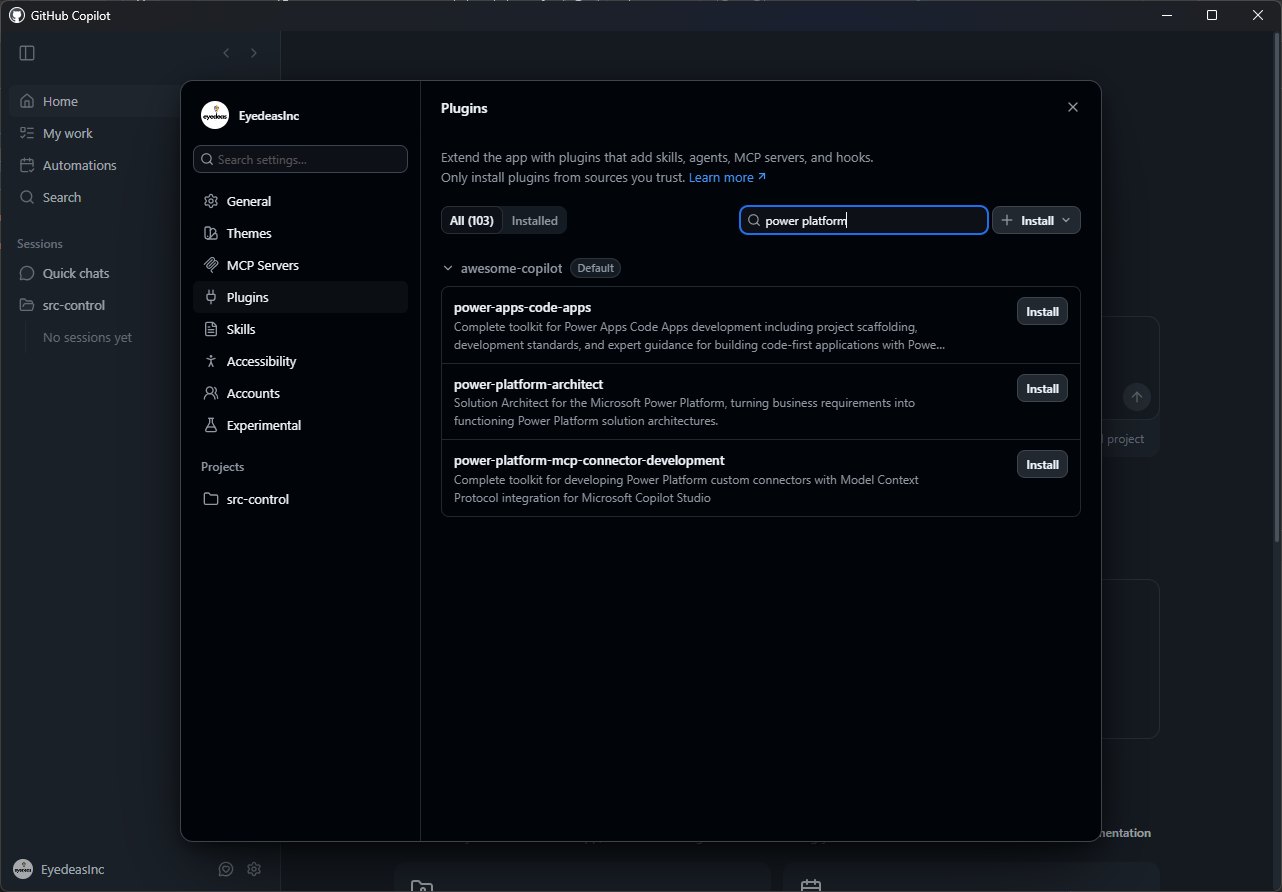
Figure 2.22. The Plugins page in the GitHub Copilot App settings, filtered to Power Platform. The default awesome-copilot source offers power-platform-architect alongside plugins for code apps and MCP connector development; MCP Servers and Skills sit one click away. Image: Zero to Hero.
The App does not replace Claude Code or the CLI for the generation-heavy chapters, which run the power-platform-skills plugins in a terminal. Use it for architecture conversations, quick MCP-backed lookups and design review.
Complete Project Structure
A fully configured Power Platform AI development project looks like this:
MyProject/
│
├── .claude/
│   ├── settings.json          # Project permissions + settings (committed)
│   ├── settings.local.json    # Personal local overrides (gitignored)
│   └── skills/                # Project-specific skills
│       └── my-custom-skill/
│           └── SKILL.md
│
├── .mcp.json                  # Project MCP servers (committed; read by Claude Code and Copilot CLI)
│
├── .github/
│   └── copilot-instructions.md    # GitHub Copilot project context
│
├── .vscode/
│   ├── settings.json              # Workspace editor + Copilot settings
│   ├── mcp.json                   # MCP servers for Copilot in VS Code (optional)
│   └── extensions.json            # Recommended extensions
│
├── CLAUDE.md                      # Project context for Claude Code (mirrors copilot-instructions.md)
│
├── .gitignore                     # Must include: .claude/settings.local.json
│
├── solutions/
│   └── MySolution/                # PAC CLI solution folder
│
├── canvas-apps/
│   └── MyApp/                     # Unpacked Canvas app (.pa.yaml files)
│       ├── App.pa.yaml
│       └── Src/
│           ├── Screen1.pa.yaml
│           └── Screen2.pa.yaml
│
├── pages/                         # Power Pages site (pac pages download)
│   ├── website.yml
│   ├── web-templates/
│   ├── web-files/
│   └── basic-forms/
│
├── flows/                         # Exported flow JSON files
│   └── WorkOrderAssignment.json
│
├── connectors/                    # Custom connector definitions
│   └── anthropic-claude.json
│
├── code-apps/                     # React + Vite Code Apps
│   └── DispatcherDashboard/
│       ├── package.json
│       ├── vite.config.ts
│       └── src/
│
└── scripts/                       # Deployment + utility scripts
    ├── deploy-dev.ps1
    ├── deploy-uat.ps1
    └── run-solution-checker.ps1
.gitignore for Power Platform AI Projects
# Claude Code personal overrides: never commit
.claude/settings.local.json

# PAC CLI auth cache
.pac/

# Node modules
node_modules/

# Build output
dist/
build/
*.msapp

# Anthropic API key (if stored in .env)
.env
.env.local

# OS files
.DS_Store
Thumbs.db
Verification Checklist
Run through these six checks after setup to confirm everything works.
claude --version prints a version and claude opens a session. Inside it, pac auth list runs without a permission prompt.claude mcp list shows them connected. “List my Dataverse tables” returns your real table names, “what Canvas controls are available?” lists controls, and “show me the Power Pages Web API documentation” quotes Microsoft Learn.copilot --version prints a version, and “list my Dataverse tables” returns real table names, not generic ones.pac auth list shows at least one profile, pac auth select --name "Dev" switches without error, and pac solution list returns your dev solutions..pa.yaml file, Ctrl+Shift+I opens Chat, and @workspace cites your files. Ask “what is the publisher prefix for this project?”: the answer is fs_.
/skills lists the Power Platform skills, /canvas-app starts the Canvas app workflow, and /dv-connect connects to your environment and registers the Dataverse MCP server.Figure 2.23. Run the checks in order. A failure at step 2 is a layer 3 problem; a wrong prefix at step 5 means your conventions file is missing or incomplete.
Quick Reference Card
Claude Code- Start:
claude, orclaude "your prompt" - Print mode for scripts:
claude -p "prompt" - List skills:
/skillsin a session - Global:
~/.claude/settings.json(model, permissions),~/.claude/CLAUDE.md,~/.claude/skills/ - User MCP servers:
~/.claude.json(claude mcp add --scope user) - Commit:
.claude/settings.json,.mcp.json,CLAUDE.md,.claude/skills/ - Gitignore:
.claude/settings.local.json
PAC CLI- Auth profiles:
pac auth create,list,select,who - Canvas:
pac canvas pack,unpack - Pages:
pac pages upload,download - Solutions:
pac solution export,import,check
Copilot in VS Code- Accept
Tab, dismissEsc, next suggestionAlt+] - Chat
Ctrl+Shift+I, inline chatCtrl+I - Context:
.github/copilot-instructions.md - Settings:
.vscode/settings.json - MCP:
.vscode/mcp.jsonor~/.copilot/mcp-config.json - Participants:
@workspace,@vscode,@terminal,@github
Copilot CLI- Start:
copilot - Add MCP server:
copilot mcp add, or/mcp addin a session - MCP servers:
~/.copilot/mcp-config.jsonor.mcp.json - Pre-approve tools:
--allow-tool='shell(pac:*)'
Figure 2.24. The four tools on one card. Everything listed under Commit belongs in git; the local overrides file never does.
Try It Yourself
These exercises practise the four-layer stack on your own machine in the Field Service project.
- Prove layers 2 and 3 are connected. In the project folder, list your MCP servers (
claude mcp list, or~/.copilot/mcp-config.jsonfor the Copilot CLI). Then ask “list my Dataverse tables” and “show me the Power Pages Web API documentation”.What good looks like
Real table names from your environment, and an answer quoting Microsoft Learn. Generic table names are a layer 3 symptom: the Dataverse MCP server is missing, disconnected, or not enabled for your client in the admin center.
- Write one layer 4 rule and watch it apply. Add “Never create a custom status column; use statecode and statuscode” to both
CLAUDE.mdand.github/copilot-instructions.md. Then ask: “Plan a Part table whose rows can be active, discontinued, or on back order. Tell me your plan before writing anything.”What good looks like
The plan uses Status Reason values on
statuscodeand nofs_statuscolumn. If one client obeys and the other does not, you edited only one file. - Put a deny rule in front of an allow rule. In
.claude/settings.json, allowBash(pac auth:*)andBash(pac solution:*), and denyBash(pac solution delete:*). In a fresh session, ask the agent to runpac auth list, then to delete a solution named DoesNotExist. In the Copilot CLI, use--deny-tool.What good looks like
pac auth listruns unprompted and the delete is blocked, because deny is checked first. A prompt instead means the deny pattern missed; the made-up name keeps that harmless.
- Think in four layers. Model, client, capability, conventions. When output disappoints, check layers 3 and 4 before you pay for a bigger model.
- Claude Code needs a paid Claude plan or API billing. Pro ($20/month) is enough for this book; Max, Team and Enterprise include it too. On API billing, set a monthly spend limit in the Claude Console first.
- For an individual, GitHub Copilot Pro ($10/month) covers every workflow in this book. Organisations buy Business ($19 per seat/month) for central management and policy; Enterprise ($39) adds a larger AI credit allowance. Check existing Microsoft and GitHub agreements first.
- PAC CLI is free and most MCP servers cost nothing to install, but Dataverse MCP calls from Claude Code or Copilot are billed in Copilot Credits, unless Dynamics 365 Premium or Microsoft 365 Copilot licensing covers the Dynamics 365 data.
- Claude Code configuration is layered: global, project, local. Structure goes in the committed project layer, personal overrides in the gitignored local layer. MCP servers live separately, in
.mcp.jsonor~/.claude.json. CLAUDE.mdis your project brief. Fill it with table names, naming conventions, connection reference names and hard prohibitions, and mirror it in.github/copilot-instructions.md.- MCP servers make your AI Client / Harness environment-aware. Set up Dataverse, Canvas Authoring, Microsoft Learn (which also serves Power Pages docs) and Context7; several arrive with the plugins.
- Permissions remove friction. Pre-approve routine PAC CLI and git commands, deny the ones that are hard to reverse, and remember deny always wins.
What's Next
Configuration is done. Part 2 starts building. Chapter 3 turns plain-language requirements into a complete, deployed Dataverse data model for the field service app, without opening the maker portal once.
References
- Models overview. Claude Platform Docs, accessed October 2026. platform.claude.com
- Plans for GitHub Copilot. GitHub Docs, accessed October 2026. docs.github.com
- Supported AI models in GitHub Copilot. GitHub Docs, accessed October 2026. docs.github.com
- microsoft/power-platform-skills (marketplace and plugins). GitHub, accessed October 2026. github.com
- Advanced setup (system requirements, install, authentication). Claude Code Docs, accessed October 2026. code.claude.com
- Plans and pricing. Claude, accessed October 2026. claude.com
- Connect to Dataverse with Model Context Protocol. Microsoft Learn, accessed October 2026. learn.microsoft.com
- Configure permissions. Claude Code Docs, accessed October 2026. code.claude.com
- Adding MCP servers for GitHub Copilot CLI. GitHub Docs, accessed October 2026. docs.github.com
- Use MCP servers in VS Code. Visual Studio Code Docs, accessed October 2026. code.visualstudio.com
- pac auth. Microsoft Power Platform CLI reference, Microsoft Learn, accessed October 2026. learn.microsoft.com
- Installing GitHub Copilot CLI. GitHub Docs, accessed October 2026. docs.github.com
- GitHub Copilot app generally available. GitHub Changelog, June 17, 2026. github.blog
Step 3 is free too: choose your AI agent.
See the AI stack and pick the tool you'll build with, the last of the three free steps. From Step 4 on (arming it for Power Platform, shipping your first build, going deeper), the step-by-step setup guides, plugin tours, templates, all 14 chapters, and the live build calls twice a month live inside the Inner Circle, free for 7 days.
Already a member? Sign in →