
Chapter 1: The Shift
From Maker to Builder
"The biggest change isn't what software can do. It's who can build it, and how fast. The Maker era is ending. The Builder era is here."
On this page

- Why 2024 and 2025 were a genuine turning point for building on Power Platform
- The difference between automation, orchestration and agency, and why it matters
- Why the Maker role is giving way to a new one, the Builder, and what separates them
- Why Power Platform professionals are unusually well placed to lead this shift
- What this book is really about: not AI in your apps, but AI building your apps
Two Ways to Think About AI and Power Platform
There are two very different ways to bring AI into Power Platform development.
The first way is to build AI into your solutions: a Copilot Studio agent in your app, a model called from a flow, a chat widget on a Power Pages site. The AI becomes a feature.
The second way is to use AI to build your solutions: Claude Code or GitHub Copilot generating your data models, writing your flows, scaffolding your Canvas apps, building your Power Pages sites and designing your Copilot Studio agents. The AI becomes a team member.
This book is about the second way. It is a development practice, not a product feature. It needs no new license and no new architecture. It needs a new habit: reaching for your AI Client / Harness before you reach for the mouse.
 A feature you ship
- A Copilot Studio agent inside your app
- A model called from a Power Automate flow
- A chat widget on a Power Pages site

 A team member
- Generates Dataverse tables, columns and relationships
- Writes flows, Canvas apps, Code apps and Power Pages sites
- Designs and tests Copilot Studio agents
Figure 1.1. One way adds AI to what you ship. The other changes how you build everything you ship. This book is about the right-hand card.
The Inflection Point
Power Platform professionals have always built faster than their pro-code counterparts. That is the platform's promise: low-code tools that turn business expertise into working software without a six month dev cycle.
Until recently, though, "building faster" still meant doing most of the work by hand. You dragged controls, wrote Power Fx, configured Dataverse columns, mapped flow conditions and wrote Liquid templates. Even for experienced makers that takes time, and remembering syntax, connector behavior and schema details adds up.
What changed in 2024 and 2025 was not only that AI got better at code. It became genuinely useful for the specific things Power Platform builders make, and it gained the tools to act on them directly: MCP servers, the PAC CLI and Microsoft's own Power Platform skills.
 Tables, columns, relationships
 A working cloud flow
 A scaffolded Canvas app
 Pages, Web API and permissions
Figure 1.2. Each layer is a chapter in Part 2. The sentence on the left is your job; the asset on the right is the agent's first draft for you to review.
From Maker to Builder
This is where the role itself changes. For years we have called ourselves makers, and the name fit. A maker does the work by hand, and the maker's value was in knowing how and doing it personally.
When AI absorbs the manual execution, that definition stops describing the most valuable thing you do. The work moves from doing every step yourself to directing a capable agent: describing the outcome, reviewing what it produces, correcting course and owning the result. That is a different job, and in this book we call it the Builder.
A Builder is not a maker who works faster. A Builder thinks in outcomes instead of clicks, directs AI instead of operating tools, and gets leverage from judgment, knowing what good looks like, rather than from memorized syntax.
- Drags controls, writes Power Fx, configures columns, maps conditions
- Thinks in clicks
- Operates the tools
- Value comes from knowing how, and doing it personally
- Owns the steps
- Describes the outcome, reviews the output, corrects course
- Thinks in outcomes
- Directs AI that operates the tools
- Value comes from judgment: knowing what good looks like
- Owns the result
Figure 1.3. A Builder is not a faster Maker. Business knowledge carries over unchanged; what changes is where your time and attention go.
graph TD
    A["Requirements<br/>understood"] --> B{"Build method"}
    B -->|"Manual maker portal"| C["Days to weeks<br/>drag, configure, wire"]
    B -->|"AI-directed build"| D["Hours<br/>describe, review, deploy"]
    C --> E["Working prototype"]
    D --> E
    style D fill:#2dd4bf,color:#0d0d14
    style C fill:#1a1a2e,color:#f1f0f8
Figure 1.4. For well scoped work, the prototype that took days in the maker portal now takes hours. The time you save moves into review, which is where your expertise matters most.
Three Mental Models Worth Getting Right
Before tools and techniques, three ideas need to be clearly separated. They get mixed up constantly, and the confusion leads to bad decisions about where AI fits in your work.
Automation
Automation is if this, then that at scale. A flow that sends an email when a SharePoint list item is created is automation. It is deterministic, repeatable and defined entirely by the person who built it. It does not reason. It has a ceiling: it only does what you anticipated.
Orchestration
Orchestration coordinates automation across systems. A flow that pulls data from Dynamics 365, enriches it with an API call, writes to Dataverse and posts in Teams is orchestration. More complex, still deterministic. Most mature Power Platform solutions live here.
Agency
Agency is where AI moves from a tool you use to a collaborator that acts. An agent has a goal and a set of tools. It reasons about how to reach the goal, takes an action, observes the result and decides what to do next, without you writing every step in advance.
Your AI Client / Harness is an agent. Ask it to "build a Dataverse data model for a field service app" and it does not just emit a table. It works out which tables the app needs, how they relate and which lookups matter, then builds across all of those decisions in sequence, adapting as it goes.
AI Client / Harnessfield-service · DevFigure 1.5. Agency in practice. Nobody scripted the reuse of Account or the extra lookups: the agent chose each step from what the last one returned, then handed the result back for you to judge. Tool names are simplified.
flowchart TD
    G["Goal<br/>a field service data model"] --> R["Reason<br/>which tables, relationships,<br/>columns, lookups"]
    R --> A["Act<br/>call a tool"]
    TL["Tools<br/>Dataverse, PAC CLI, files"] -.-> A
    A --> O["Observe<br/>read the result"]
    O --> D{"Goal met?"}
    D -->|"no, adapt"| R
    D -->|"yes"| Y["Result for you<br/>to review"]
    style G fill:#a855f7,color:#f1f0f8
    style Y fill:#2dd4bf,color:#0d0d14
Figure 1.6. Agency is a loop, not a script. That loop is what makes the agent feel like a developer rather than a search engine.
Figure 1.7. This book uses AI at all three levels: automating repetitive generation, orchestrating multistep builds, and relying on agent reasoning for design decisions. A long flow is still not agency. Length is not reasoning.
Why Power Platform Professionals Are Uniquely Positioned
A common assumption is that AI-assisted development is a pro-code story, and that you need Python or TypeScript to benefit. That assumption is wrong. Power Platform professionals bring three things many traditional developers lack, and each one is a quality gate the agent cannot supply for itself.
1. Deep Business Process Knowledge
Prompt for a claims processing solution and you already know the tables, the approval chain, the required fields and the edge cases. A developer new to your domain would spend weeks gathering requirements. You start with them.
2. The Full Power Platform Ecosystem
When the agent suggests a pattern that conflicts with your DLP policy or your environment strategy, you catch it. That domain knowledge is the quality gate that makes AI-generated Power Platform work actually deployable.
3. Governance and ALM Literacy
Most important, you understand solutions as the unit of governance. Everything AI generates (tables, flows, Canvas apps, pages, agents) must land in a named, publisher-prefixed solution before it can be reviewed, tested and promoted as a managed solution to UAT and Prod. That mental model is what makes AI output deployable, not just runnable.
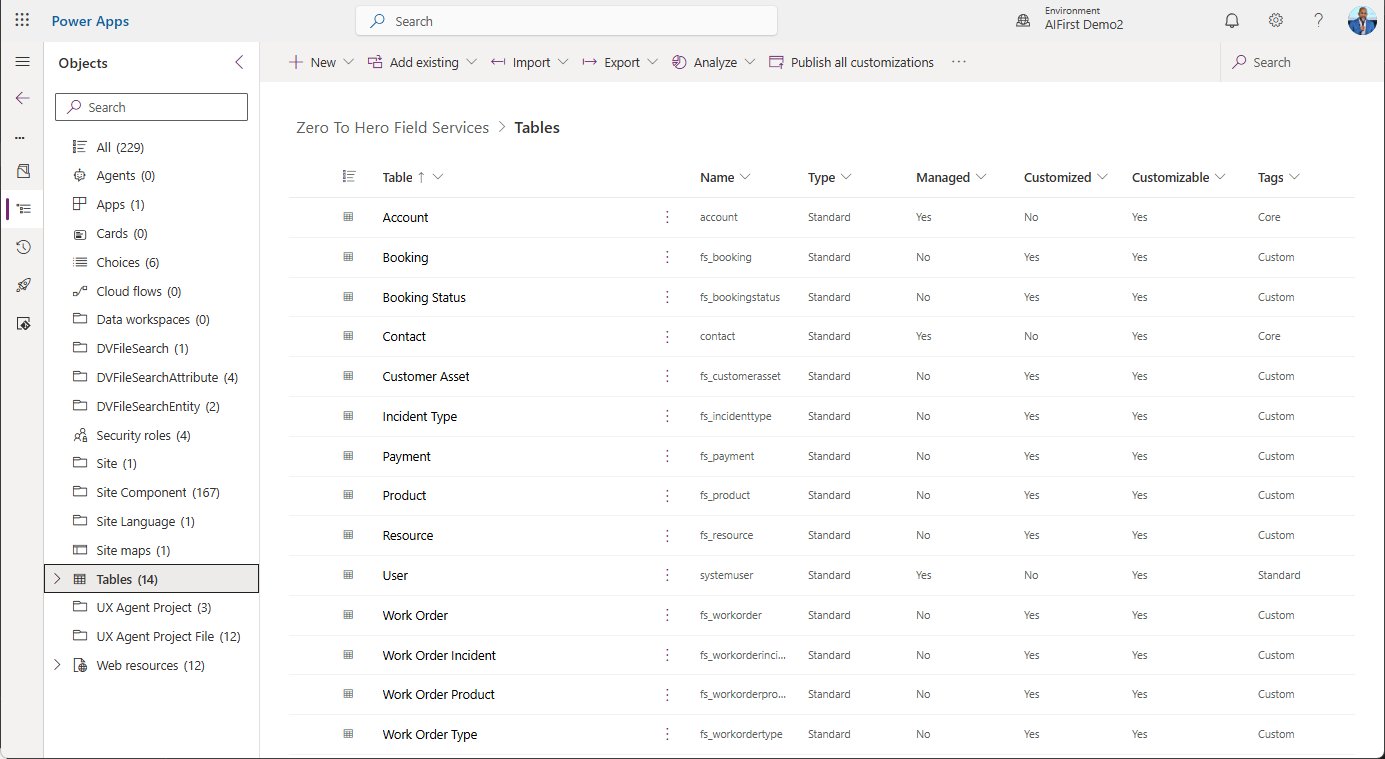
Figure 1.8. The unit of governance in practice. Every table the agent built for the Field Service solution sits in one named solution under one publisher prefix, fs_, beside the standard Account, Contact and User tables it reused instead of recreating. Image: Zero to Hero.
What this book adds is the practice layer: how to direct AI tools well, how to review what they generate, and how to build a workflow where Claude Code and GitHub Copilot speed you up instead of creating new problems.
What This Book Is About
This book is about using AI to build Power Platform applications faster, more consistently and with higher quality than you could alone. Building AI features into your apps appears once, in Chapter 11.
Claude CodeGitHub CopilotDataversePower AutomateCopilot StudioFigure 1.9. By the end, you will not ask "should I use AI for this?" You will ask "what is the fastest way to direct AI to build this?"
The Running Thread
Each Part 2 chapter builds a complete, deployable asset with AI, and every one adds a layer to the same field service management solution. By the end of Part 2 you have a working solution you can reference, adapt and use as a template.
fs_ tables and lands in the same solutionFigure 1.10. Chapters 3 to 10 at a glance. Each one is a real, deployable asset, not a toy demo.
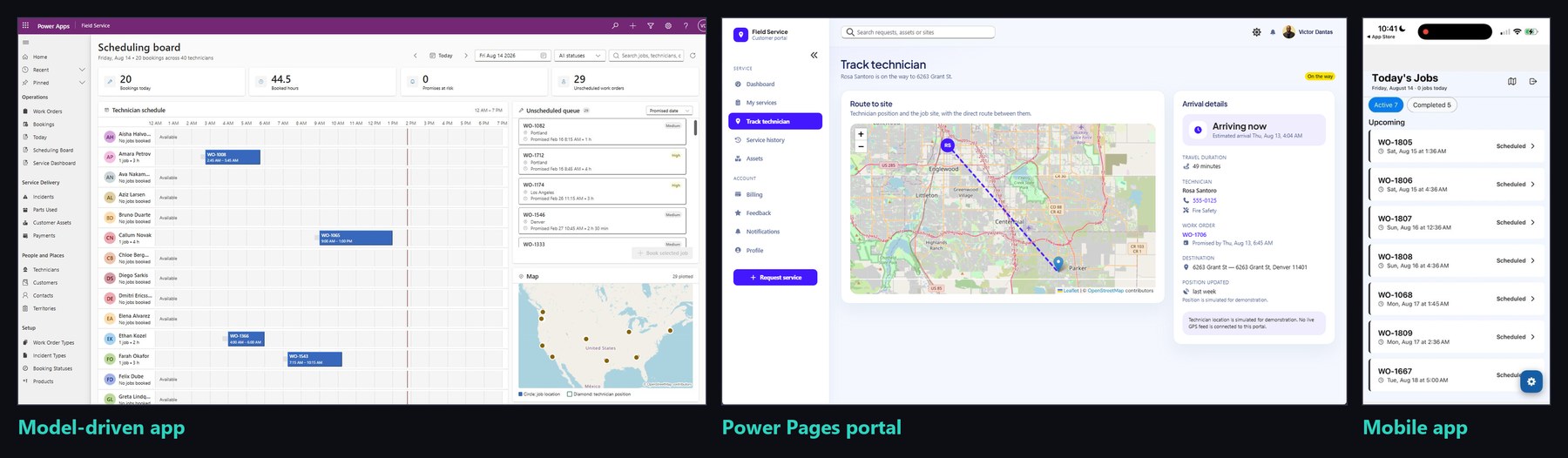
Figure 1.11. One set of fs_ records, many surfaces. Real screens from the finished solution: a model-driven scheduling board for dispatchers, a Power Pages portal where customers track their technician, and a mobile app for the technician's day. Image: Zero to Hero.
Try It Yourself
These exercises practise the chapter's distinctions on the Field Service solution you build in Part 2.
- Sort five ideas into two columns. List five ideas for the Field Service solution, such as a Copilot Studio agent for technicians or your AI Client / Harness generating the work order table. Mark each as AI in the solution or AI building it.
What good looks like
Each idea lands in one column. The usual slip is filing a generated flow as AI in the solution: if the AI only wrote it and the flow does not reason, it is building.
- Name the level for three processes. Write one Field Service process that is automation, one that is orchestration, and one request that needs agency. For each, answer: who decides the steps?
What good looks like
Automation and orchestration both answer "the person who built it"; only agency leaves the steps to the agent. The likely mistake is calling a long multi-system flow agency. Length is not reasoning.
- Rewrite one Maker task as a Builder brief. Take a task you last did by hand in the maker portal and rewrite it as a request to an agent: the outcome, the constraints (a named solution, the
fs_prefix), and three things you will check in the result.What good looks like
A paragraph that describes a result, not clicks, and names the solution. If your list of checks is empty, you have described steps but not what good looks like, which is the Builder's actual job.
- This book is about using AI to build Power Platform, not building AI into Power Platform. One is a feature; the other is a practice.
- Automation, orchestration and agency are different things. The test is who decides the steps. Agency explains why the agent behaves like a developer, not an autocomplete.
- Power Platform professionals start ahead: business process knowledge, ecosystem fluency and governance literacy. A developer who learned Claude last week has none of them.
- The gap between requirements and a working prototype has collapsed. The question is no longer whether AI can help, but whether you are directing it well.
What's Next
Chapter 2 is where we set up. You will install Claude Code and GitHub Copilot, connect them to your Power Platform environment through the Dataverse MCP server and the PAC CLI, and generate your first Power Platform asset before you have written a single formula or dragged a single control.
Next up: set up your AI dev team, free.
The first four steps of the Builder's Journey are free. Chapter 2 gets your AI dev team configured, so carry straight on. The rest of the journey (all 14 chapters, the step by step setup guides, connecting to Dataverse, templates and live build calls twice a month) lives inside the Inner Circle Academy, free for 7 days.
Already a member? Sign in →